
AI Study Tools That Are Better Than ChatGPT
Still pasting your lecture notes into ChatGPT and crossing your fingers? A lot of students do this, and honestly it works, just not as well as you’d think. AI study tools that are better than ChatGPT already exist for nearly every academic task you can name, from turning a messy PDF into a flashcard deck in under a minute to producing a fully cited literature review. ChatGPT is a fantastic conversationalist.
But it wasn’t built around how students actually study, and that gap shows up the moment your workload gets heavy. In this guide you’ll learn which specialized platforms outperform ChatGPT for research, memorization, essay writing, tutoring, and staying organized, plus a comparison table and a simple framework for picking the right tool for this semester.
Why ChatGPT Isn’t Always the Best Choice for Studying
ChatGPT is a strong generalist, no argument there. It explains concepts clearly and can carry on a natural back-and-forth conversation about almost anything. Even so, it wasn’t purpose-built for coursework, and a few gaps become obvious once you lean on it every day.
For one, it doesn’t automatically turn a 50-page reading into an organized flashcard deck without a lot of manual copying and pasting on your end. Its answers also aren’t always grounded in the exact material you gave it, so summaries can drift toward generic or occasionally a little off. There’s no built-in spaced repetition scheduling either, and that’s the method with the strongest track record for long-term memory. And when it comes to academic research, citation accuracy tends to be shakier than tools built specifically for scholarly search.
Pro tip: keep ChatGPT around for brainstorming and open-ended explanations, but pair it with a dedicated AI study tool for the repetitive, structured parts of studying.
NotebookLM: Best for Source-Grounded Research and Audio Summaries
Google’s NotebookLM has become one of the more talked about ChatGPT alternatives for students, mostly because it only answers based on what you actually upload. Add PDFs, Google Docs, slide decks, or even a lecture recording link, and every response gets built around that specific material instead of general internet knowledge.
What makes it stand out is fairly simple once you use it a few times. Source-grounded answers mean fewer made-up facts and less of that vague, textbook-generic tone. There’s also an audio overview feature that turns your notes into something closer to a casual podcast conversation you can listen to while doing something else. Recent updates even added automatic flashcard and quiz generation straight from your sources.
Plenty of students say they’ve listened to an audio overview during a commute or a workout and retained more from that fifteen minutes than from an hour of rereading slides at a desk. You can check the official feature set on Google’s NotebookLM page if you want the full picture.
Expert note: Because NotebookLM sticks to your uploaded sources, it’s genuinely useful for exam prep on material your professor actually assigned, rather than pulling in general web knowledge that might not line up with your syllabus at all.
Quizlet AI and Anki: Best for Flashcards and Active Recall
If memorization is the bottleneck, a purpose-built flashcard app is going to beat a chatbot almost every time. Quizlet AI can spin up a full flashcard set from pasted notes in seconds, then layer in practice tests and matching games on top. Anki takes a different approach, using a spaced repetition algorithm that schedules your reviews right before you’re statistically likely to forget a card.
Why does this beat a general chatbot? Spaced repetition is a well-documented learning technique, explained in detail on Wikipedia’s spaced repetition page, and it needs scheduling logic that a conversational AI just doesn’t offer on its own. Active recall, meaning testing yourself instead of passively rereading, is baked into the core experience of both apps. And both sync across devices, so a deck you build on a laptop shows up instantly on your phone between classes.
Statistic worth remembering: cognitive science research consistently shows that spaced, active recall practice produces meaningfully better long-term retention than passive review. That’s exactly the gap ChatGPT alone doesn’t close.
Claude: Best for Long Documents and Essay Writing
Once the task shifts from memorizing to writing, Claude tends to become the favorite for students working through long research papers. Its ability to process a lot of pages in a single pass makes it well suited for reviewing multiple sources at once, drafting literature reviews, and tightening up essay structure.
Where it tends to pull ahead of ChatGPT for coursework specifically: it can hold and reason across many uploaded pages at the same time, which helps a ton when you’re synthesizing several journal articles into one argument. Feedback on structure, tone, and clarity also tends to be more detailed than generic. And it’s often praised for improving academic writing without flattening a student’s own voice into something that sounds robotic.
Here’s what that looks like in practice. A student juggling twelve research papers for one assignment can upload all of them at once and ask for a synthesized outline, which is a lot more cumbersome to pull off with a shorter context window.
Perplexity AI: Best for Cited Research
Research accuracy is really where AI research assistant tools separate themselves from a standard chatbot. Perplexity answers questions with linked, verifiable sources attached to nearly every claim, and that matters a lot for academic work that needs proper citation.
A few reasons students lean on it. Every answer comes with clickable source links, so you can verify information before it ends up in your paper. It runs live web searches instead of relying purely on static training data, which keeps things current. And for systematic literature reviews, pairing Perplexity with a more specialized tool like Elicit or Connected Papers can sharpen source mapping and citation accuracy even further.
Pro tip: always click through to the original source before citing anything an AI tool hands you. Even citation-focused tools occasionally misattribute a claim, so that quick verification step protects your academic integrity more than you’d think.
Khanmigo: Best AI Tutor for Guided Learning
Not every student wants a tool that just hands over the answer. Khan Academy’s Khanmigo is built to act more like a patient tutor, asking guiding questions instead of giving away the solution right away, which mirrors how a good human tutor nudges you toward understanding instead of a memorized answer.
A few things stand out here. The prompts adapt to a student’s current skill level instead of offering a one-size-fits-all explanation. Subject coverage spans math, science, reading, and writing, and it stays closely aligned with what’s actually taught in classrooms. The whole conversational style is built around pedagogy rather than general chit chat.
You can look through Khan Academy’s own description on the Khanmigo product page to see how the guided questioning actually plays out.
Did you know guided questioning, sometimes called the Socratic method, has been used in education for centuries because it strengthens problem-solving skills rather than just short-term recall? That’s something a straightforward chatbot answer usually doesn’t reinforce.
Notion AI: Best for Organizing Your Entire Study Workflow
Even the best research and memorization tools fall apart without something to hold it all together. Notion AI extends a familiar note-taking workspace with automatic summarization, task generation, and searchable databases for class notes, deadlines, and reading lists.
Why students pick it over a plain chatbot usually comes down to structure. Notes, assignments, and AI-generated summaries all live in one connected workspace instead of scattered across a dozen chat threads. Automatic summarization condenses long lecture notes into something you can actually study from. And database views make it simple to track deadlines across several classes in one dashboard instead of five separate ones.
Example worth picturing: a student managing five classes could build one Notion workspace with a shared database, tagging each note by course and exam date, something that’s basically impossible to replicate cleanly inside a single chat window.
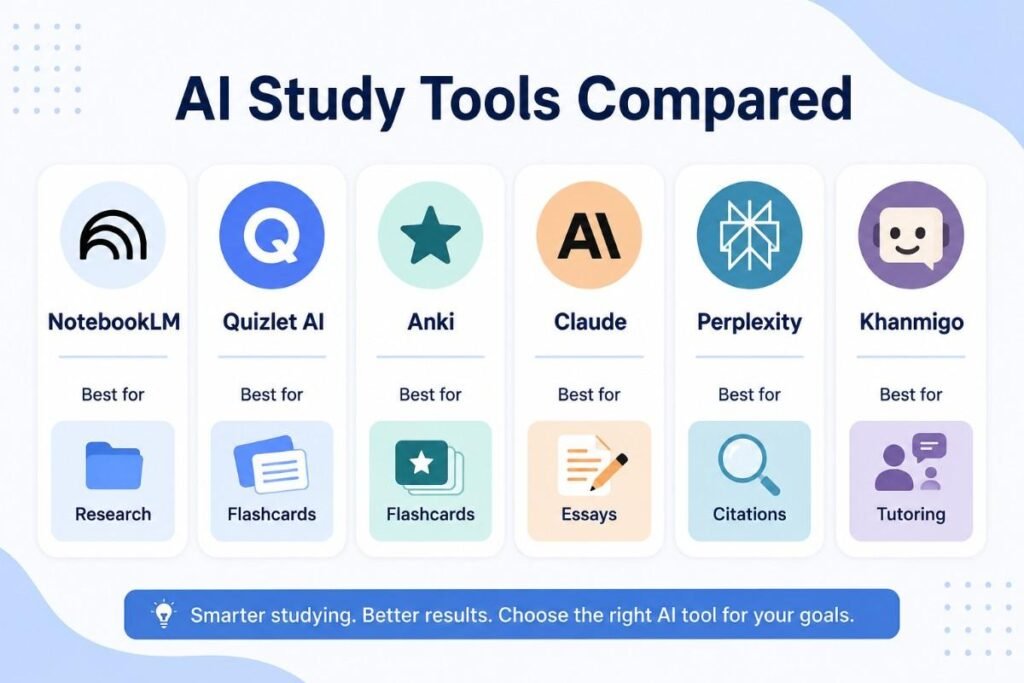
AI Study Tools vs ChatGPT: Side-by-Side Comparison
| Feature | ChatGPT | NotebookLM | Quizlet AI / Anki | Claude | Perplexity | Khanmigo |
|---|---|---|---|---|---|---|
| Source-grounded answers | Limited | Excellent | Not applicable | Good | Excellent | Good |
| Flashcards and spaced repetition | Manual only | Good | Excellent | Manual only | Not applicable | Not applicable |
| Long document handling | Good | Excellent | Not applicable | Excellent | Good | Not applicable |
| Cited research | Moderate | Good | Not applicable | Good | Excellent | Not applicable |
| Guided tutoring style | Moderate | Not applicable | Not applicable | Moderate | Not applicable | Excellent |
| Best for | General explanation | Research and audio review | Memorization | Essay writing | Citations | Step-by-step tutoring |
No single platform wins at everything here, and that’s really the point. Most productive students in the USA now combine two or three specialized tools rather than expecting one general chatbot to cover every task.
How to Choose the Right AI Study Tool for Your Needs
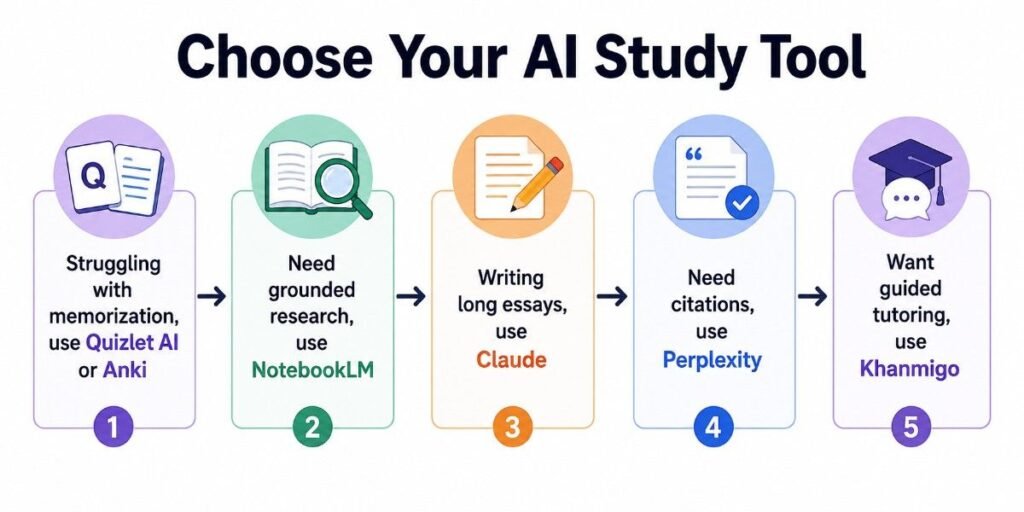
Picking the right tool really comes down to naming your actual bottleneck this semester, not chasing whatever app is trending on social media.
Struggling with memorization? Start with Quizlet AI or Anki for spaced repetition flashcards. When trusting AI-generated summaries of your own readings is the real issue, NotebookLM keeps every answer grounded in what you uploaded. Writing long essays or literature reviews tends to go faster with Claude, thanks to its document handling. Citations matter most to you? Lean on Perplexity, and still verify every source link before you submit anything. And if guided learning sounds more useful than instant answers, Khanmigo’s tutoring style builds stronger understanding over time. Organization is the real problem instead? Notion AI ties everything together in one place.
Expert note: most students in the USA report the best results from combining two tools, one for creating content and one for organizing or reviewing it, rather than forcing a single AI assistant to handle everything at once.
Conclusion
ChatGPT remains a capable generalist, but it’s no longer the automatic best choice for every academic task. The strongest AI study tools that are better than ChatGPT are the ones built around a specific job: source-grounded research with NotebookLM, spaced-repetition memorization with Quizlet AI or Anki, long-document essay writing with Claude, cited research with Perplexity, guided tutoring with Khanmigo, or full workflow organization with Notion AI.
Three things worth remembering. Match the tool to the task instead of forcing one chatbot to handle everything. Purpose-built features like spaced repetition and source grounding directly close gaps that a general chatbot leaves open. And combining two or three specialized tools tends to beat relying on a single AI assistant for the whole semester.
Try pairing one memorization tool with one research or writing tool this week, and pay attention to how much faster your study sessions actually feel.
Frequently Asked Questions
Are there AI tools better than ChatGPT for studying?
Yes. Tools like NotebookLM, Quizlet AI, Claude, and Perplexity are built for specific study tasks such as source-grounded research, flashcard generation, long document writing, and cited research—things ChatGPT wasn’t specifically designed to handle.
What is the best free AI study tool for college students?
NotebookLM and Quizlet AI both have strong free tiers that cover core study needs. NotebookLM works well for source-based research and audio summaries, while Quizlet AI handles flashcard creation and practice testing at no cost for basic use.
Is NotebookLM better than ChatGPT for research?
For research tied to specific course material, yes. NotebookLM only answers based on documents you upload, which cuts down on made-up facts and keeps responses tightly aligned with your actual syllabus and readings.
Can AI make flashcards from my notes automatically?
Yes. Tools like Quizlet AI and NotebookLM can convert pasted or uploaded notes into flashcard decks within seconds, saving a lot of manual formatting time compared with building cards by hand.
Is it cheating to use AI study tools?
Generally no, when you’re using them for practice, organization, and understanding rather than submitting AI-generated work as your own. Always check your school’s specific academic integrity policy before relying on any AI tool for graded assignments.
Which AI tool is best for writing essays and citations?
Claude is often recommended for essay structure and long document synthesis, while Perplexity is better suited for gathering cited sources you can verify and reference directly in your paper.
Do these AI study tools work on mobile devices?
Most of the tools listed here, including NotebookLM, Quizlet, Perplexity, and Notion AI, offer mobile apps or mobile-friendly web versions, so reviewing flashcards or listening to an audio summary between classes is pretty painless.
Should I use one AI tool or several for studying?
Combining two or three specialized tools, say one for research and one for memorization, generally works better than relying on a single all-purpose chatbot for every academic task.