
How Do I Use AI on My Phone? Complete 2026 Guide
This is an unusual statistic. The majority of phones available in the U.S. today come with an AI assistant integrated into the system. Individuals simply do not turn the switch off. If you’ve been typing in Google at 11pm with “How do I use AI on my phone?” or thinking, “I must be missing something,” you’re not alone. The tools are likely to be in your home. You haven’t found them yet. It doesn’t matter whether you use an iPhone running on Apple Intelligence or run Android; the features are there, for free, and just a few taps away. From the initial confusing setup screen to the tips that almost nobody takes the time to learn, there’s a lot of it in this guide.
In this guide, you’ll learn what AI your phone has, how to enable AI for iPhone and Android, the fastest way to find out how to get AI on my phone if it’s not there, and a genuine list of how people use this every day. No jargon. No guessing games. Just here’s the button; press it.
What AI Does My Phone Have Right Now
Before touching a single toggle, figure out what AI my phone already has. It depends on the brand. It depends on how new your model is. Big variables.
iPhone: Apple Intelligence
Apple Intelligence has shipped since iOS 18.1. iPhone 15 Pro or newer? Any iPhone 16? You’re almost certainly covered. It runs a rebuilt Siri, writing tools that clean up your rambling texts, Image Playground for generating pictures out of nowhere, and visual intelligence that IDs objects through your camera lens.
Android: Gemini and Gemini Nano
Google swapped the old Google Assistant out. Gemini’s the default now on newer Android builds, Android 16 included. A lot of phones also run Gemini Nano, a smaller model that lives entirely on your device, no internet required, quietly powering call summaries, smart reply suggestions, and keyboard proofreading on the fly.
Samsung Galaxy AI
Samsung stacks its own layer on top. Live call translation. Note summarization. Photo tools like Generative Edit. Own a recent Galaxy? You’ve probably got Gemini and Samsung’s suite running side by side, whether you noticed or not.
How Do I Use AI on My Phone: iPhone Setup
Staring at your screen, wondering, how do I use AI on my phone? Apple kept this one short on purpose.
Checking If Your iPhone Qualifies
You need an iPhone 15 Pro or later, or any iPhone 16, running the newest iOS. Also, about 7 gigabytes of free storage for the download. Clear out old screenshots first. Trust me.
Turning On Apple Intelligence
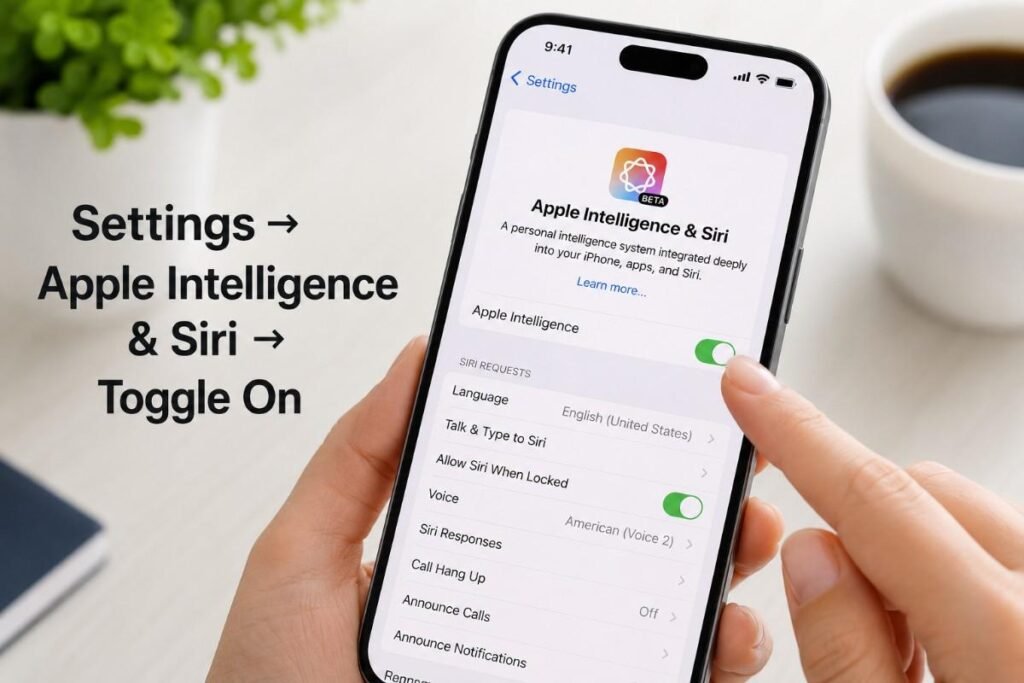
Settings, then Apple Intelligence and Siri, then tap the button. That’s it. Models download quietly in the background. Stay on Wi-Fi and power while it happens; Apple says it can take anywhere from a few minutes to a couple hours, no rush.
What Changes Once It Is On
Siri suddenly remembers what you just asked it. Follow-up questions actually work now. Writing tools show up inside Mail, Notes, and Messages, ready to summarize or rewrite whatever you typed in a hurry. Press and hold Camera Control, point at a menu in another language, and boom—translated. Point at a flyer and add the event to your calendar without typing a thing.
How Do I Use AI on My Phone: Android Setup
Android’s a little different depending on whether Gemini showed up preinstalled or needs a manual download.
Switching From Google Assistant to Gemini
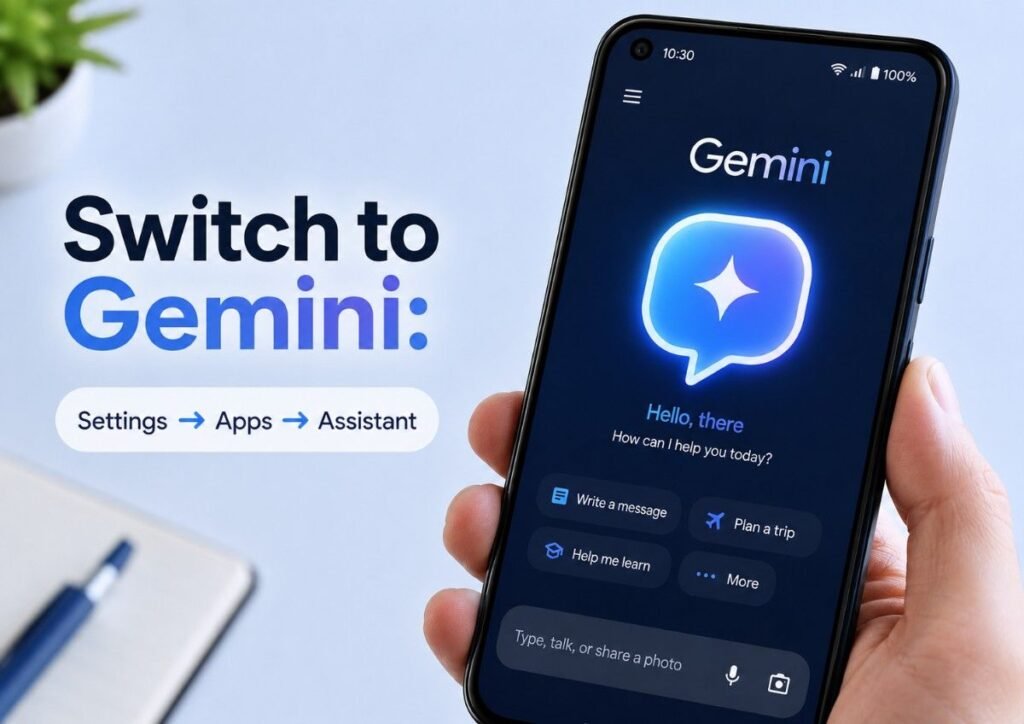
Settings, Apps, Assistant, and Digital Assistants from Google. See Google Assistant listed as active? Tap Gemini instead and confirm the switch. On plenty of phones, a long press on the power button now pulls up Gemini instantly.
Installing Gemini If It Is Missing
Not preloaded? Play Store, search for Gemini, and install. You’ll need a Google account, Android 10 or later, and at least 2 gigabytes of RAM. Works across 45+ languages and over 150 countries. Wide net.
Turning On Hands-Free Voice Commands
Open Gemini, tap your profile picture, Settings, then Talk to Gemini hands-free, and follow the “Hey Google” prompts. Once Voice Match kicks in, you can talk to Gemini any time your screen’s on. Sometimes even when it’s off.
How to Turn AI On Step by Step
Just want the fast version of how to turn AI on? Here it is, no detours.
On iPhone
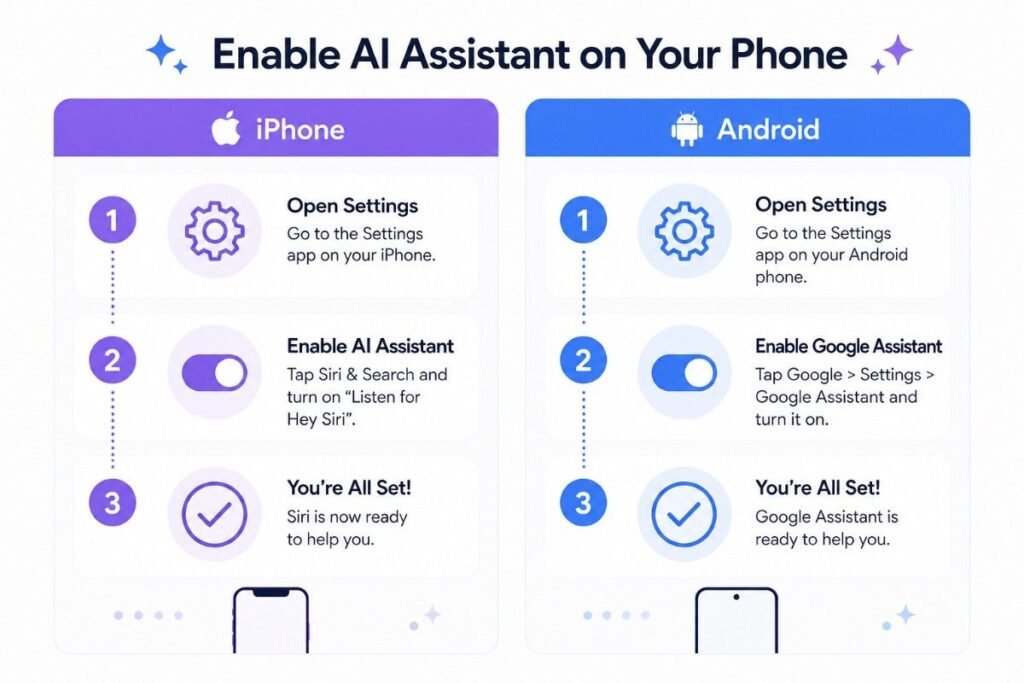
Settings. Apple Intelligence and Siri. Tap the toggle. Done. No subscription, no waitlist; it’s free for every eligible device, full stop.
On Android
Settings, Apps, Assistant, Digital assistants from Google, pick Gemini. Samsung phone specifically? Settings, Advanced features, Side button, Long press, and Confirm Digital Assistant are selected so a long press pulls up Gemini instantly.
Setting It as Your Default Everywhere
Both platforms let you assign a power button press, a side button press, or a wake word as the trigger. Two minutes of setup now. Saves you from hunting down an app icon every single time later. Worth it.
How Do I Get AI on My Phone If It Is Missing
Some people search, “How do I get AI on my phone?” because there’s genuinely nothing there. A few usual suspects explain why.
Your Software Is Out of Date
Both platforms need a current OS. Check your update settings first. An outdated iOS or Android version just won’t show the option at all, no matter how many menus you dig through.
Your Device Does Not Meet Hardware Requirements
Older or budget phones often lack the horsepower. Apple Intelligence wants an iPhone 15 Pro minimum. Gemini’s fancier on-device tricks need the Gemini Nano version 3, mostly found on 2026 model-year phones like the Pixel 10 lineup.
Regional or Language Restrictions
Not every country gets Apple Intelligence yet. Same story with certain Gemini features. Sometimes the fix is checking your region settings. Sometimes the fix is just waiting.
Everyday Ways People Actually Use Phone AI
Knowing how to turn AI on is step one. The payoff shows up in the boring daily stuff.
Summarizing Long Content
A long email, a dense article, that hour-long meeting recording—both Apple Intelligence and Gemini can crunch it down into a short paragraph in seconds. Consistently one of the most requested features across both ecosystems, and it’s easy to see why.
Editing Photos Without Extra Apps
Samsung’s Generative Edit and Apple’s Image Playground both let you erase something you don’t want in the frame or generate a whole image from a text description. No separate editing app needed.
Drafting and Fixing Messages
Writing Tools on iPhone and Magic Compose on Android can rewrite a message in a different tone, catch typos as you go, and suggest a quick reply based on the conversation. All without leaving the messaging app.
Comparison: Built-In Phone AI vs Downloading a Separate App
| Factor | Built-In Phone AI | Separate Downloaded App |
| Cost | Free with your phone | Often free with paid tiers |
| Setup Time | A few taps in Settings | App store download plus account setup |
| Works Offline | Yes, for many on-device features | Rarely, it needs internet |
| System Integration | Deep, works inside Messages, Camera, Mail | Limited to the app itself |
| Best For | Everyday quick tasks, photos, messages | Specialized tasks like coding or deep research |
Troubleshooting Common Problems
The Toggle Is Greyed Out
Usually a storage or hardware issue. Free up space, double-check your model qualifies, restart the phone, and try again. Fixes it most of the time.
Siri or Gemini Stops Responding
Restart first. Almost always solves it. Still broken? Check that your software’s up-to-date and that you’re signed into the right account; a logged-out account trips people up more than you’d think.
The download never finishes.
Wi-Fi and power, both, the whole time. Cellular data or a low battery can stall the download indefinitely; Apple actually warns about this directly.
Conclusion
So, what can you do with AI on your phone today? Simply go to the Settings app. On iPhone, go to Apple Intelligence and Siri and on Android it’s Assistant and toggle the switch. It’s that simple. The primary objective of the AI use case is to make things faster and smarter in everyday life. Now here are three points to keep in mind: they are already available on your cell phone; they are free; and they are waiting for you to use them. It only takes a few minutes to set up, including downloads. The payoff? Better text, pics, and instant summaries appear within the blink of an eye. Not eligible yet? That’s usually sorted out in a quick software update, or download from the app store. Come on, take a look at your phone’s settings, what has it been doing this whole time?
Frequently Asked Questions
How do I use AI on my phone for the first time?
Open Settings and look for Apple Intelligence and Siri on iPhone, or Assistant under Apps on Android. Toggle it on, follow the short prompts, and the models download automatically. You’ll be using it within minutes, no complicated setup required.
What AI does my phone have if it is a Samsung Galaxy?
Samsung Galaxy phones typically run Google Gemini and Samsung’s own Galaxy AI together. That means Gemini handles general assistant tasks while Samsung layers in exclusives like live call translation and generative editing for photos.
How do I get AI on my phone if my model is older?
Check your software updates first, since a lot of older phones just need the latest OS installed. If your hardware genuinely can’t handle it, downloadable AI apps still work fine, just without the deep system integration.
How to turn AI on without losing my current assistant settings?
Switching assistants doesn’t wipe anything. On Android, choosing Gemini under Digital assistants from Google simply sets it as the new default while your old preferences stay put in the same menu, untouched.
Is phone AI actually free to use?
Yes. Apple Intelligence and Gemini’s core features cost nothing; no subscription is needed. Some extras, like unlimited image generation and premium Gemini models, might require a paid plan depending on how heavily you use them.
Does using AI on my phone drain the battery faster?
On-device processing uses a bit of extra power, but it’s efficient, built for dedicated chip hardware. Cloud-based requests actually drain more, thanks to constant data transmission, so offline features tend to be easier on your charge.
Can I use AI on my phone without an internet connection?
Plenty of features work offline, especially on-device tools like Gemini Nano proofreading or Apple’s Writing Tools. Anything needing live info, current events, or web searches still needs a connection to function properly.
How do I use AI on my phone to edit photos?
Open your default photo editor and look for a generative or AI edit option, usually Image Playground on iPhone or Generative Edit on Galaxy devices. Select the area, describe the change you want, and the result generates in seconds.