

System Prompts and Models of AI Tools: The Complete Guide
Ever wonder why ChatGPT refuses certain requests while another chatbot happily answers? Why does Cursor write code differently than Claude Code? The answer usually is not the underlying model at all. It is a hidden block of text called a system prompt. And a massive open-source project called “system-prompts-and-models-of-ai-tools” has made hundreds of these instructions public for anyone to study.
This guide breaks down system prompts and models of AI tools in plain language. You will learn what a system prompt actually does and how to read the real examples collected on GitHub. Why tools like ChatGPT, Cursor, and Claude Code behave so differently. And how to write your own effective system prompt using the same patterns professional AI teams use. In this guide you’ll learn how these hidden instructions work and where to find trustworthy examples. a
And how to apply the same techniques to your own AI projects.
What Is a System Prompt and Why Does It Matter
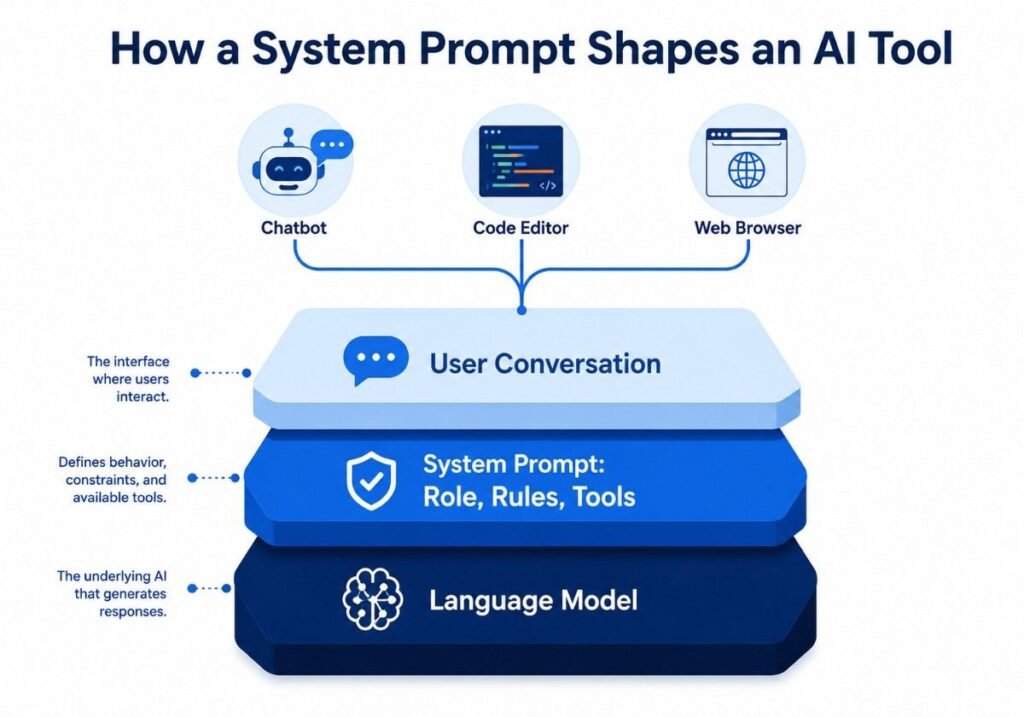
A system prompt is a set of instructions an AI application sends to a language model before the user ever types a word. It defines the assistant’s role, tone, boundaries, and available tools. Think of it as a job description handed to the model at the start of every conversation.
Unlike a user prompt, which changes with every message, the system prompt usually stays fixed across a session or is only updated by the developer. It is the reason two products built on the same underlying model, say GPT or Claude, can feel completely different to use.
System Prompt vs Model
People often confuse the two. The model is the trained neural network doing the actual reasoning. The system prompt is the configuration layer sitting on top of it. A single model like GPT can power a customer support bot, a coding assistant, and a creative writing tool, and the only real difference between them is often the system prompt and the tools attached to it. This distinction is central to understanding system-prompts-and-models-of-ai-tools on GitHub, since the repository documents both halves of that equation together.
Why System Prompts Went From Secret to Public
For most of 2023 and 2024, companies treated their system prompts as trade secrets. Then developers began extracting them through clever prompting techniques, and communities started organizing the results. According to reporting on the trend, a repository documenting these extracted instructions grew to cover dozens of major AI coding tools and crossed well over one hundred thousand GitHub stars, making it one of the most starred AI resources on the platform. That kind of traction shows just how much developers wanted a transparent look under the hood of tools they use every day.
Pro tip: If you are evaluating an AI tool for your business, reading its publicly documented system prompt, when available, tells you more about its actual capabilities and limits than its marketing page ever will.
Inside the System-Prompts-and-Models-of-AI-Tools GitHub Repository
The repository officially titled system-prompts-and-models-of-ai-tools is maintained on GitHub and organizes extracted instructions folder by folder, one per product. It has become the reference point anyone searching for system prompts and models of AI tools on GitHub eventually lands on.
What the Repository Actually Contains
Each folder typically includes the full text of the tool’s system prompt, a list of the internal tools or functions the AI can call, and sometimes notes on which underlying model powers the product. Coverage has expanded well beyond the original handful of tools to include coding assistants, browser agents, and general-purpose chatbots such as
- Coding agents like Cursor, Windsurf, Claude Code, and Devin AI
- Website builders such as v0, Lovable, and Same.dev
- Research and browsing tools including Perplexity and Manus
- General assistants and productivity copilots from several major vendors
Expert note: The value of this collection is not the novelty of reading a competitor’s prompt. It is the pattern recognition you gain from comparing dozens of production system prompts side by side, something almost no individual developer could assemble alone.
Why the Project Went Viral
The maintainer originally shared a handful of prompts obtained through community reporting, and the project’s own release notes describe growing from a single viral post to tens of thousands of stars within weeks. Momentum kept building as more contributors submitted newly discovered prompts, and the project now credits dozens of contributors and hundreds of commits. The scale is part of what makes it useful as a study resource rather than a one-off curiosity.
How System Prompts Shape ChatGPT and Other AI Tools
Understanding system prompts and models of AI tools, ChatGPT specifically, helps explain a common source of confusion: why the same underlying technology feels so different across products.
The Persona and Boundary Layer
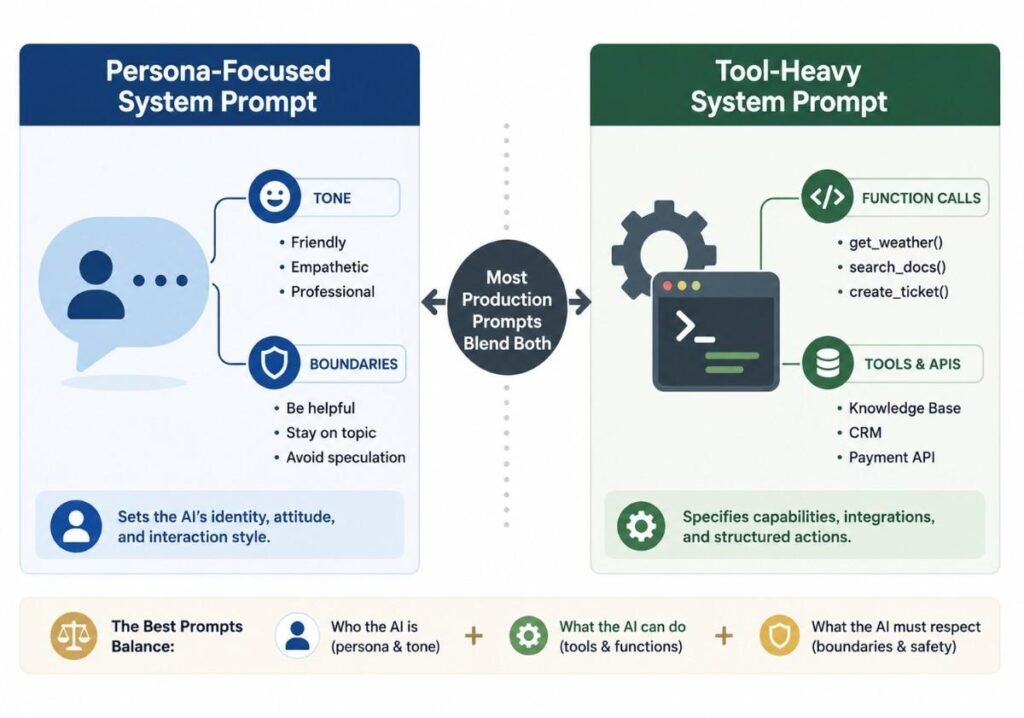
A typical consumer chatbot’s system prompt establishes a persona, sets a tone, and lists topics or actions the assistant should avoid. This is why ChatGPT, Claude, and Gemini each have a recognizable “voice.” That voice is not baked into the model weights alone. It is reinforced every single session by a written instruction the user never sees.
The Tool and Agent Layer
Coding assistants add a second, more technical layer. Their system prompts describe every internal function the model is allowed to call, such as reading a file, running a terminal command, or searching the web, along with strict rules about when to use each one. This is the layer that turns a general-purpose language model into an AI agent capable of taking real actions rather than just producing text.
Statistic: Reporting on the trend notes the flagship repository now documents system prompts for more than two dozen distinct commercial AI tools, spanning everything from browser copilots to autonomous coding agents, which illustrates just how standardized this two-layer design pattern has become across the industry.
Real AI System Prompt Examples You Can Learn From
Studying AI system prompt examples is one of the fastest ways to improve your own prompting and product design skills. A few recurring patterns show up again and again across the collection.
Role and Identity Framing
Almost every prompt opens by naming the assistant, describing its purpose in one or two sentences, and stating who built it. This grounding reduces hallucinated identity claims and sets user expectations immediately.
Explicit Do and Do Not Lists
Production prompts rarely rely on vague guidance like “be helpful.” Instead, they enumerate specific behaviors: how to format code blocks, when to ask a clarifying question, when to refuse, and how to cite sources. Specificity, not length, is what separates an effective system prompt from a weak one.
Tool Descriptions With Strict Usage Rules
Agentic tools spell out exactly when a function should be called, what parameters it needs, and what to do if it fails. A well-written tool description reads almost like an API specification aimed at the model itself rather than at a human developer.
Comparison snapshot: Persona-focused prompts optimize for tone and trust, while tool-heavy prompts optimize for reliability and safety during autonomous actions. Most production systems blend both, weighting each differently depending on whether the product is conversational or task-driven.
System Prompts and Models of AI Tools GitHub vs Other Awesome AI System Prompts Collections
Several communities maintain their own lists once the original project proves how useful the idea is. Searchers looking for a GitHub search awesome-ai-system-prompts-style resource or a broader AI system prompts GitHub search will typically encounter a few recurring formats. The table below compares them.
| Collection Type | Primary Focus | Update Frequency | Best For |
|---|---|---|---|
| Flagship repository (system-prompts-and-models-of-ai-tools) | Coding agents and full commercial tools | Frequent, versioned with tool updates | Developers evaluating AI coding assistants |
| Community “awesome” lists | Curated links across many smaller projects | Occasional | Discovering niche or open-source tools |
| Single-tool mirrors | One product’s prompt history over time | Tied to that product’s releases | Tracking how one vendor’s instructions evolve |
| Educational blogs and guides | Explaining concepts with example prompts | Ongoing | Beginners learning prompt engineering basics |
Pro tip: If you only have time to bookmark one resource, the flagship repository is the most consistently maintained, since it tracks version changes as tools like Claude Code and Cursor ship new updates.
How to Use an AI System Prompt Generator to Build Your Own
Once you understand the patterns, the next natural step is writing your own instructions. Many people search for an AI system prompt generator hoping for a shortcut, but the strongest results still come from combining a generator with a clear manual framework.
A Practical Manual Framework
- Define the role in one sentence. State exactly what the assistant is and is not.
- List three to five hard boundaries. Cover topics to avoid, tone requirements, and formatting rules.
- Describe available tools precisely. If the assistant can browse the web or run code, explain exactly when to use that capability.
- Add fallback behavior. Tell the model what to do when it is unsure or when a tool fails.
- Test with edge cases. Try to break your own prompt before shipping it, the same way the tools documented in the repository were reverse engineered by curious users.
Where Generator Tools Fit In
AI-powered prompt generators are useful for a first draft, especially for structuring long lists of tool descriptions quickly. The official prompting guidance published by OpenAI recommends being explicit about format, audience, and constraints rather than relying on vague adjectives, which lines up closely with what production system prompts in the repository actually do. Treat any generated draft as a starting point, then tighten the boundaries and test it against real conversations before relying on it in production.
Did you know? According to guidance from MIT Sloan’s teaching and learning technology team, three of the most effective prompting strategies are providing context, being specific, and building iteratively on the conversation, the exact same principles reflected in the professionally written system prompts collected in this repository.
Security, Ethics, and Best Practices When Studying AI System Prompts
Reading extracted system prompts raises legitimate questions about security and fair use, and any serious guide on this topic needs to address them directly rather than glossing over them.
The Real Risk for AI Startups
If a system prompt can be extracted through clever user input, that same technique is a form of prompt injection and risk. Companies building AI products should treat their own system prompt the way they treat any other sensitive configuration, assuming a motivated user may eventually see it and designing safeguards that do not depend on secrecy alone.
Responsible Ways to Use the Repository
- Use the examples to learn patterns, not to copy a competitor’s exact wording into a commercial product
- Respect the license and attribution terms listed on the repository page
- Treat any extracted prompt as unverified until you can confirm it against the vendor’s own documentation
- Avoid using leaked internal tool names or credentials found in any prompt for anything beyond educational review
Expert note: The most durable skill you can take from studying this repository is not memorizing any single prompt. It is recognizing the underlying structure, role definition, explicit boundaries, tool rules, and fallback logic that show up across almost every well-built AI product on the market today. well-built
Conclusion
System prompts are the quiet architecture behind every AI tool you use, and the system-prompts-and-models-of-ai-tools repository has turned that hidden layer into a genuine learning resource for developers, marketers, and curious builders alike. Three takeaways matter most here. First, a system prompt, not just the underlying model, is usually what makes one AI tool feel different from another. Second, studying real AI system prompt examples from tools like ChatGPT, Cursor, and Claude Code reveals repeatable patterns you can apply to your own projects. Third, writing an effective system prompt comes down to a clear role, explicit boundaries, precise tool rules, and testing against edge cases, not clever wording alone.
If you build with AI in any capacity, bookmark the repository, study a handful of prompts from tools you already use, and start drafting your own system prompt using the framework above. Understanding system prompts and models of AI tools is quickly becoming as fundamental to working with AI as understanding APIs was to the last decade of software development.
Frequently Asked Questions
What is a system prompt in AI?
A system prompt is a hidden instruction set an AI application sends to a language model before any user message. It defines the assistant’s role, tone, rules, and available tools, shaping how the model responds throughout the conversation.
Where can I find real AI system prompt examples?
The most comprehensive public source is the system-prompts-and-models-of-AI-tools GitHub repository, which organizes extracted instructions from dozens of commercial AI tools, including coding assistants, browsers, and general chatbots, all in one place.
Is it legal to view leaked system prompts?
Viewing publicly shared, community-sourced system prompts for educational purposes is generally not restricted, but reproducing a company’s exact proprietary wording in a competing commercial product can raise intellectual property concerns, so treat examples as learning material rather than copy-paste content.
How do I write my own AI system prompt?
Start with a one-sentence role definition, add three to five explicit boundaries, describe any tools precisely, include fallback behavior for uncertain situations, and test the prompt against realistic edge cases before deploying it.
What is the difference between a system prompt and a user prompt?
A system prompt is set once by the developer and usually stays fixed for the whole session, while a user prompt changes with every message the person types. The system prompt controls overall behavior, and the user prompt drives each specific response.
Can system prompts be hacked or exposed?
Yes. Techniques broadly called prompt injection or prompt extraction have been used to reveal supposedly hidden instructions from many commercial AI tools, which is exactly how much of the flagship repository’s content was originally obtained.
Why do ChatGPT and other tools behave differently even on similar models?
The underlying model is only part of the equation. The system prompt layered on top defines persona, tone, and allowed actions, so two products built on comparable models can feel completely different depending on how that layer is written.
Do all AI coding tools use the same kind of system prompt?
No. While most share a common structure, role definition followed by tool rules, the specifics vary widely. Some emphasize step-by-step planning, others emphasize strict formatting, and the differences are exactly what the repository lets you compare directly.