Law Insider AI Assistant: The Complete 2026 Guide
Ask any lawyer how much of their week disappears into reading contracts nobody actually enjoys reading, and you will usually get a tired laugh instead of a number. Contract review and drafting are two of the most time-consuming parts of legal work, and they rarely feel like the part of the job that required a law degree. That is the exact problem the Law Insider AI assistant was built to solve.
Law Insider has been around since 2009, and for most of that time it was best known as a free, searchable library of sample contracts and clauses. Over the past couple of years the company turned that library into something bigger. It became the foundation for an AI assistant that can draft new clauses and review contracts from the other side. It can also redline documents directly in Microsoft Word. The assistant checks AI-generated language against millions of real agreements before anyone signs off.
In this guide, you will learn what the Law Insider AI assistant does. You will see how it works behind the scenes. We will also compare it with tools like ChatGPT and explain its costs. You will learn how legal teams use it every day.
Whether you are a solo attorney, part of an in-house legal team, or comparing contract tools, this guide will give you a clear and honest view of the platform.
What Is the Law Insider AI Assistant
AI-poweredThe Law Insider AI assistant is an AI powered legal tool that generates contract clauses, reviews and redlines agreements, and answers questions about contract language. It runs on large language models, but the part that sets it apart is that it checks its own output against Law Insider’s public database of real contracts rather than relying purely on whatever the underlying model learned during training.
That database is the older, more familiar part of the product. It started as a free tool that legal professionals used to search sample contracts and pull real clause language for their own drafting. After Law Insider was acquired by SimpleDocs in 2025, the company combined that existing database with its newer AI tools and started calling the result precedent-based AI, which is a fair description of what makes it different from a general-purpose chatbot.
There are two main ways to use it. The web experience lets you search sample contracts and clauses or chat with the AI assistant directly at lawinsider.com/chat. The Microsoft Word add-in lets you review, redline, summarize, and comment on a document without ever leaving Word.
Pro tip: if your team already spends most of its day marking up contracts inside Word, start there instead of the web chat. Keeping redlines and comments inside the actual document your counterparty will see saves a step and avoids version confusion later.
How the Law Insider AI Assistant Works
Most AI writing tools generate text purely from patterns they picked up during training. That works fine for a blog post, but it is a real problem for a contract, because a model with no grounding can write a clause that sounds completely reasonable while having no connection to how that clause is actually used in the real world. Law Insider takes a different approach, and it comes down to three pieces working together: the contract database, the AI model layer, and a scoring system called the Law Insider Index.
The Contract Database
At the base of everything is a public database built from millions of real, filed contracts and clauses, covering industries from technology to real estate to healthcare. This is not training data in the usual sense. It functions more like a reference library the AI actually queries while it drafts or evaluates language, a bit like how retrieval-augmented generation systems pull outside documents into a model’s context before it answers a question. You can read more about how that general approach works on Wikipedia’s entry on retrieval augmented generation.
The AI Model Layer
Clause generation happens through OpenAI’s models, but Law Insider constrains the prompts so the output stays consistent with a document’s existing defined terms, formatting, and tone. If a contract already capitalizes the word “Agreement,” a newly drafted clause will match that formatting automatically instead of introducing an inconsistency a reviewer would have to catch by hand.
The Law Insider Index Score
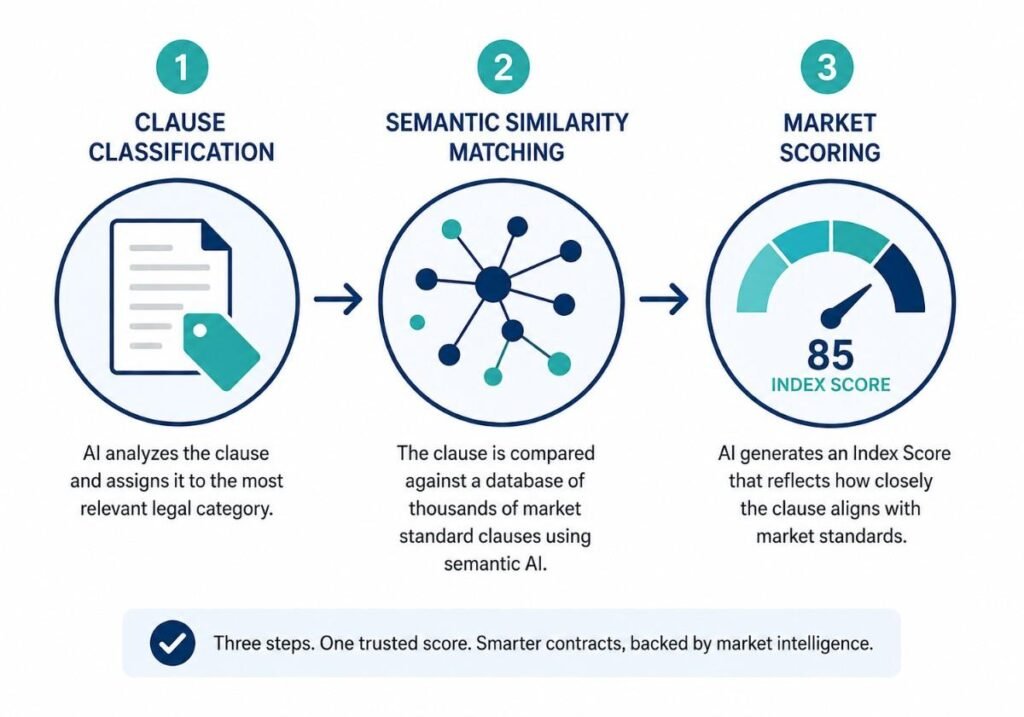
This is probably the single feature that separates the product from a typical AI contract review tool. When the assistant drafts or evaluates a clause, it runs through three steps.
- Clause classification. The system figures out which of hundreds of clause types the language belongs to, things like limitation of liability, assignment, or termination for convenience.
- Semantic similarity matching. The AI compares the clause with millions of real clauses. It uses vector embeddings and legal-specific language models. These models analyze the clause’s structure, intent, and tone instead of simply matching keywords.
- Market scoring: The AI checks how common the language is. It also measures semantic similarity. The clause then gets a score from highly atypical to highly standard. The system also shows real examples. These examples include clauses that are closest to and furthest from the suggestion.
Expert note: a high index score tells you a clause resembles what is common across similar real-world agreements. It does not tell you whether that language is right for your specific deal. That judgment still belongs to a qualified reviewer, not the score.
Core Features Explained
AI-Powered Contract Drafting
The assistant can generate a full first draft or a single missing clause from a plain language prompt. Because every suggestion gets checked against the contract database, the results tend to avoid that generic, obviously AI-written feel you get from unguided drafting tools.
Contract Review and Redlining
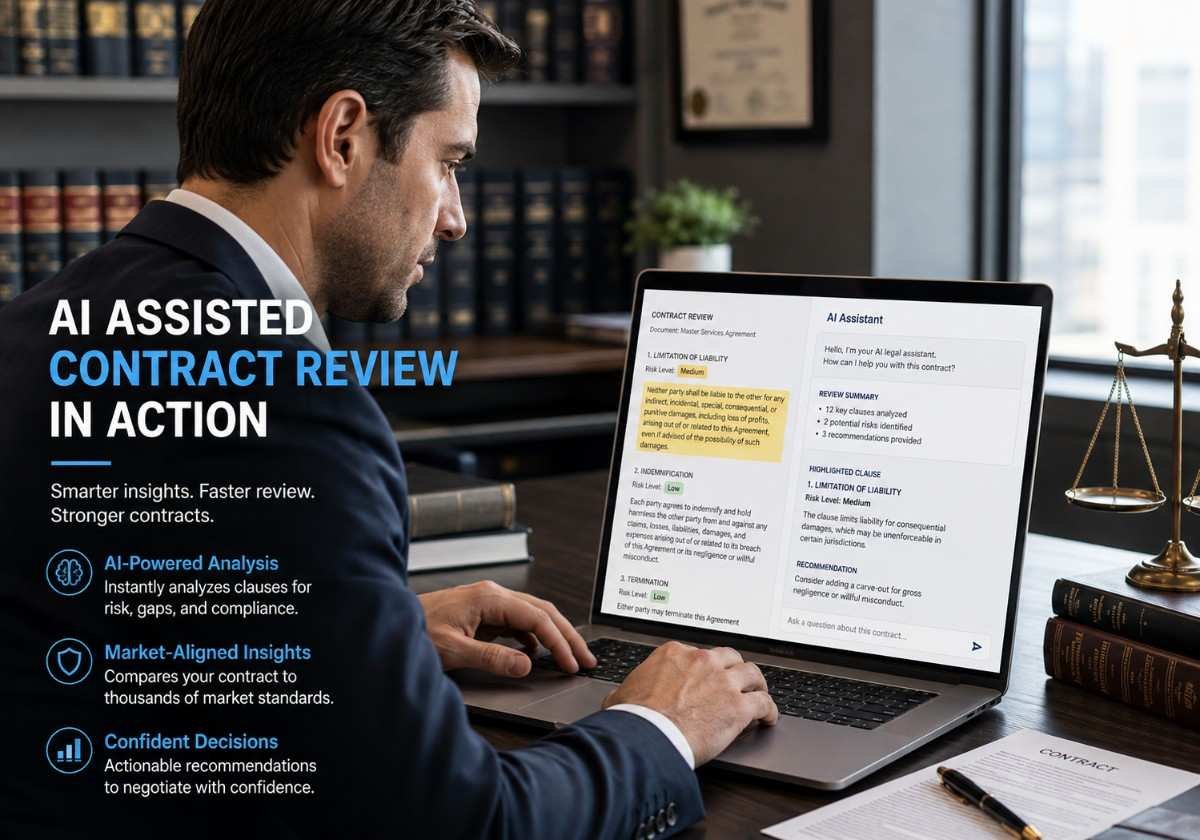
Inside Word, the tool reads the open document. It flags potential risks. It also suggests redlines based on a default risk profile or your custom playbook.
You can ask questions about the document as you work. For example, you can request a simple summary of the indemnification section. You can do this without leaving the file.
Clause Benchmarking
Any clause, whether it came from the AI or from the other side of the negotiation, can be run through the Law Insider Index to see how it compares against market norms. That turns a vague feeling like this seems aggressive into something closer to an actual data point you can point to.
Playbooks
Law Insider offers more than 40 standard playbooks for common agreement types. Teams can also create custom playbooks with their preferred fallback positions.
This helps the AI clause generator follow the same standards across every contract. It keeps reviews consistent, no matter which team member handles the contract.
Term Sheet and Standards Comparison
The tool can also compare a contract with a term sheet. It can also compare it with industry standards such as oneNDA.
It flags language that differs from the agreed baseline. This is useful during fast negotiations. It helps teams track changes across multiple rounds of redlines.
Law Insider AI Assistant Compared With Other Legal AI Tools
| Feature | Law Insider AI Assistant | ChatGPT for general use | Generic contract software |
|---|---|---|---|
| Precedent-grounded output | Strong, every clause is benchmarked against real contracts | Weak, no built-in legal precedent database | Depends on the vendor, usually rule-based rather than AI-native |
| Native word: redlining | Strong | Not built in | Often available, but exports can be clunky |
| Clause benchmarking score | Strong, through the Law Insider Index | Not available | Rare |
| Public contract search | Strong, millions of free sample clauses | Not available | Not available |
| Custom playbooks | Strong | Requires manual prompting every time | Usually available |
| Data training policy | States it does not use customer data to train shared models | It depends on the plan and settings you choose | Varies by vendor |
| Best fit | Contract heavy legal and business teams | General drafting and brainstorming, non-legal writing | Teams that need broader workflow or e-signature features |
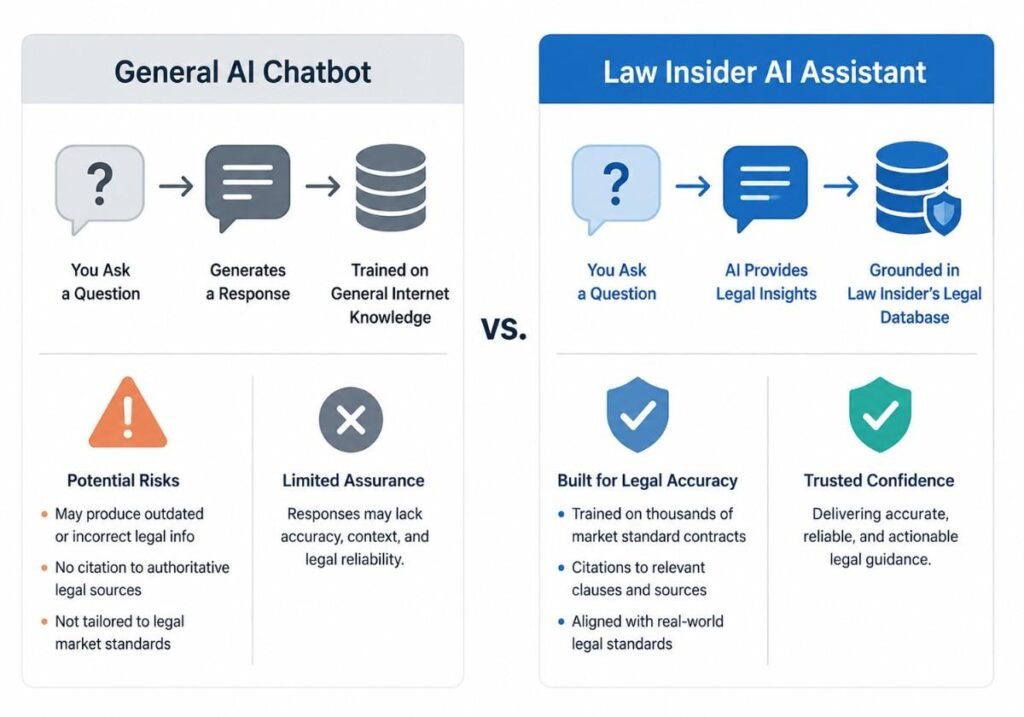
No single legal AI assistant wins on every dimension here. A general model like ChatGPT is easier to start using and more flexible outside of legal work, but it has no built-in way to tell you whether the clause it just wrote resembles anything that has actually been negotiated in a real deal. That gap is a big part of why precedent-based tools have found traction specifically among legal teams.
Real World Use Cases
In-House Counsel Reviewing Vendor Contracts
In-house teams often receive contracts on the vendor’s own template, and those templates tend to lean in the vendor’s favor. Running that document through an AI contract review tool with a custom playbook attached flags the clauses that fall outside the company’s risk tolerance and suggests redlines aligned with the team’s usual positions, which turns a multi-hour first pass into something closer to a few minutes of focused review.
Solo Practitioners Drafting From Scratch
A solo attorney handling a new engagement can generate a first draft grounded in real precedent language instead of starting from a stale template pulled out of an old matter, then benchmark each clause before sending anything out.
Legal Operations Standardizing Playbooks
Legal ops leads use custom playbooks to make sure every reviewer on a distributed team is working from the same fallback positions, which cuts down on the inconsistency that shows up naturally when five different attorneys redline the same type of agreement five different ways.
Negotiation Support
During an active negotiation, comparing incoming redlines against a term sheet or a standard like oneNDA quickly shows where a counterparty’s changes have drifted from what was originally agreed, helping negotiators respond faster without rereading the entire document every single round.
Did you know? Law Insider’s database has served a global community of more than a million registered legal users, and the company reports over twelve thousand combined customers following its 2025 merger with SimpleDocs, a scale that gives the benchmarking layer a genuinely large sample of real contract language to draw on.
Pricing and Plans
Under the current SimpleAI plan structure, Law Insider offers a few tiers.
The legacy or search-only plan lets you search public contracts and clauses, with drafting available through the AI assistant, priced per user per month and billed annually at a discount.
The SimpleAI plan for solo users includes full AI-powered contract drafting, review, and redlining along with database access, and it is aimed at solo practitioners and small teams.
The Enterprise plan adds advanced custom playbooks, precedent benchmarking at scale, an AI repository, and deeper integrations for larger legal teams.
A free trial of the AI assistant is available online with usage limits, and you do not need to enter payment details to start it. You are only asked for billing information once you decide to subscribe after the trial limit runs out. For teams that want to test the redlining and benchmarking workflow before committing budget, that free tier is the natural place to begin. You can check current details directly on the Law Insider pricing page.
How to Get Started
Step 1: Try the Free AI Assistant
Start with the web chat at lawinsider.com/chat to get a feel for how the assistant drafts clauses and answers questions before you install anything.
Step 2: Install the Word Add In
For teams doing serious redlining, the Microsoft Word add-in is where the real workflow lives. Upload or open a contract and start asking questions or requesting redlines right inside the document.
Step 3: Choose or Build a Playbook
Pick one of the forty-plus standard playbooks that fits your agreement type, or build a custom playbook that reflects your organization’s actual fallback positions rather than a generic default.
Step 4: Benchmark Before You Send
Before a draft goes out or a redline gets accepted, run the key clauses through the Law Insider Index and see where they land on the market alignment spectrum.
Step 5: Train Your Reviewers
Even the best AI clause generator falls flat if the people using it do not understand its limits. Make sure your reviewers treat index scores and AI suggestions as a starting point for their own judgment, not a replacement for it.
Common Challenges and How to Avoid Them
- Over-trusting AI-generated language. A high index score reflects how common a clause is in the market, not whether it is legally correct for your specific deal. The fix is simple: keep a qualified reviewer in the loop for anything beyond a routine, low-risk agreement.
- Inconsistent playbook adoption. Teams that skip the step of actually configuring a playbook end up with every reviewer applying their own informal standards, which defeats the purpose of using a shared tool. The fix is to invest the time upfront to build one current, shared playbook per agreement type.
- Confidentiality concerns. Legal teams are right to be cautious about running client contracts through any third-party AI tool. Law Insider states that it does not use customer data to train shared models, but any organization should still confirm current data handling terms and check them against its own confidentiality obligations before uploading sensitive agreements.
- Treating the tool as a full replacement for legal judgment, which it was never meant to be. AI contract tools are decision support, not decision-makers. Framing internal training around augmenting a reviewer’s judgment rather than replacing it keeps quality from quietly slipping as adoption grows.
Conclusion
The Law Insider AI assistant stands out in a crowded legal AI market for one specific reason. It does not just write plausible-sounding contract language; it checks that language against millions of real, executed agreements before anyone sends it. Three things matter most here. First, the Law Insider Index Score turns clause review from a gut feeling into something you can actually benchmark against market practice. Second, the word “add-in” makes the tool genuinely usable inside a lawyer’s existing workflow instead of forcing a new platform on top of it. Third, a free trial with no payment details required makes it low risk to test before spending any budget.
If your team spends real hours every week drafting, reviewing, or redlining contracts, it is worth trying the Law Insider AI assistant against your own agreements and seeing firsthand how the benchmarking changes the way you review.
Frequently Asked Questions
What is the Law Insider AI Assistant?
It is an AI-powered legal tool that generates contract clauses, reviews and redlines agreements, and answers contract-related questions. It is grounded in Law Insider’s public database of millions of real clauses. Rather than relying purely on general training data.
Is Law Insider AI Assistant free?
A free trial of the AI assistant is available online with usage limits, and no payment details are required to start it. Full access to drafting, redlining, and benchmarking features requires a paid SimpleAI or Enterprise plan once the trial limit is reached.
How does the Law Insider Index Score work?
It classifies a clause by type, compares it against millions of real clauses using semantic similarity matching, and assigns a market alignment score ranging from highly atypical to highly standard, along with example clauses for context.
Is Law Insider safe to use with confidential contracts?
The company states it does not use customer data to train shared AI models. Legal teams should still confirm current data handling and security terms directly with the vendor before uploading sensitive documents, which is normal practice with any outside vendor.
Can Law Insider AI Assistant redline documents in Microsoft Word?
Yes. The Word add-in lets users review, redline, summarize, and comment on documents directly inside Word without exporting to a separate platform.
How is Law Insider different from ChatGPT for legal work?
ChatGPT is a general-purpose model without a built-in contract database or benchmarking system. Law Insider’s assistant checks every drafted or reviewed clause against real, executed contract language and scores it for market alignment, which lowers the risk of confidently written but atypical language slipping through.