

What Is Blaze AI? Full 2026 Review & Pricing Guide
More than 1,300 people have left a public review of Blaze AI on Trustpilot alone, and thousands more have installed the separate AI Blaze Chrome extension without realizing it is a different product from the same rough space. So what is Blaze AI, really? In short, it is an AI-powered marketing platform that plans, writes, and posts content for small businesses on something close to autopilot, while a similarly named browser tool called AI Blaze helps individuals write faster inside Gmail, Google Docs, and social apps.
In this guide you’ll learn what Blaze AI actually does, what it is used for day to day, how the AI Blaze extension works for students and professionals, what it costs right now, how to log in and get started, and whether the glowing reviews hold up under scrutiny. We also compare it against a few well-known alternatives so you are not guessing. By the end, you will know exactly which version of Blaze fits your situation, if either does at all.
What Is Blaze AI? A Plain English Overview
Blaze AI is a content marketing platform built for small business owners, solo entrepreneurs, and lean marketing teams who do not have hours to spend brainstorming posts, writing captions, or scheduling emails. The company scans your website and social presence, builds a brand profile from it, and then generates a running batch of content that matches your tone, your industry, and your existing customers.
The platform was founded in 2022 and has grown mostly through short-form video marketing rather than traditional advertising, which is part of why so many people encounter the brand on TikTok or Instagram before they ever visit the website. Founder Lauren Rothwell has spoken publicly about building the company around a distinctive retro superhero visual identity specifically so it would stand out in a feed full of gray, forgettable SaaS ads.
Blaze AI vs the AI Blaze Chrome Extension
This is the part almost every other article skips, and it is the single biggest source of confusion in this topic cluster.
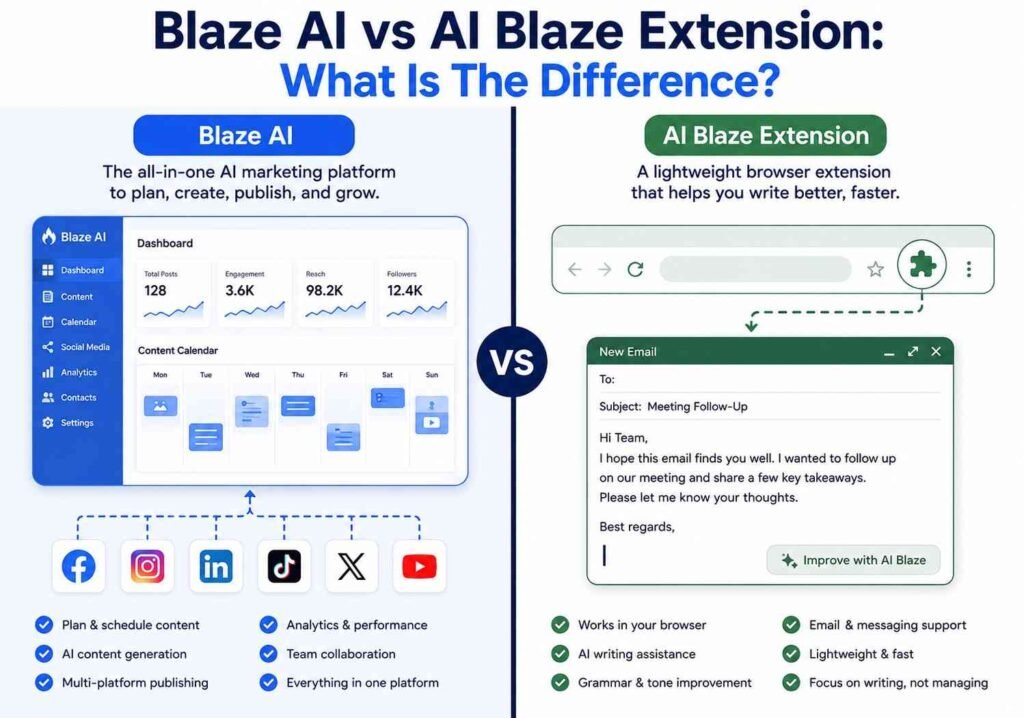
- Blaze AI (blaze.ai) is a full marketing platform. It generates blog posts, social captions, email campaigns, and images, then schedules and posts them automatically across connected accounts.
- AI Blaze (blaze.today), sometimes called Text Blaze, is a free Chrome extension. It lives in your browser and helps you write faster wherever you already type, using text snippets, keyboard shortcuts, and an AI sidebar powered by models like GPT and Claude.
They share a name and a general theme of using artificial intelligence to save writing time, but they are built by different teams for different jobs. If you searched for the AI Blaze extension hoping to install something on your browser, you want Blaze.today. If you searched because you run a small business and need weekly social posts on autopilot, you want blaze.ai.
The Core Idea Behind Blaze AI
The pitch is simple: instead of opening a blank document every Monday and trying to think of five things to post, you connect your accounts once, and the system produces a full week of content for review. You approve, tweak, or reject pieces, and over time the AI learns your preferences. It is closer to hiring a very fast, always available junior marketer than to using a generic chatbot.
What Is Blaze AI Used For? Core Features Explained
Understanding what Blaze AI is used for in practice means looking past the homepage buzzwords and into the actual daily workflow.
Automated Content Generation
The platform writes blog articles, social captions, email newsletters, and ad copy based on prompts, your brand kit, and information scraped from your website. Users describe feeding it a rough topic or letting it run in full autopilot mode, where it chooses topics on its own each week.
Multi-Platform Scheduling
Once content is approved, Blaze can auto-post across major social networks, blogging platforms, and email tools rather than requiring you to copy and paste into five different apps. This is the feature most reviewers single out as the actual time saver, more so than the writing itself.
Brand Voice and Brand Kit
Every workspace stores a brand kit: logo, color palette, tone guidelines, and sample content. This keeps output consistent even when a business manages several products or locations, and it is one of the reasons agencies use separate workspaces per client rather than mixing brands together.
Image and Basic Video Generation
Blaze can produce accompanying graphics and short video clips for posts. Reviewers are more mixed here than on the writing side, with several noting the visuals can feel repetitive or slightly off-brand compared to the text output, which tends to score higher in independent reviews.
Done For You Management
For businesses that want zero hands-on involvement, Blaze offers tiers where an actual human strategist sets up and manages the account, including paid ad campaigns across search and social. This sits at the far end of the pricing spectrum, discussed below.
The AI Blaze Chrome Extension: Features for Everyday Writing
Separate from the marketing platform, the AI Blaze extension solves a narrower problem: writing the same kinds of messages over and over inside your browser.
How the Extension Works
After installation, AI Blaze sits quietly in the corner of your browser. Typing a saved shortcut expands into a full snippet, a template email, or a customer reply. A sidebar can also summarize a webpage, rewrite a paragraph in a different tone, translate text, or fix grammar on the spot, using models such as GPT-4, GPT-5, or Claude depending on your settings. It works across Gmail, LinkedIn, Google Docs, and most other text fields on the web, and the company states it holds SOC 2 certification around data handling.
AI Blaze for Students
AI Blaze for students covers a handful of practical, everyday uses that map directly onto its core writing and summarizing features:
- Turning rough notes into a cleaner first draft of an email to a professor or group project partner.
- Summarizing long articles or research pages before deciding whether to read them in full.
- Cleaning up grammar and tone in application essays, cover letters, or forum posts.
- Saving reusable snippets for repetitive tasks, like citation formats or standard email openers used across a semester.
None of this replaces actually doing the coursework, and using it to generate full essays for submission would run into most schools’ academic integrity policies, so students should treat it as a drafting and editing aid rather than a shortcut around the thinking part.
How to Install AI Blaze
AI Blaze installation takes only a few minutes:
- Go to the Chrome Web Store and search for “AI Blaze,” or visit blaze. today directly and click through to the store listing.
- Click Add to Chrome and confirm the permissions prompt.
- Pin the extension icon to your toolbar for quick access.
- Create a free account with an email address or a Google login.
- Choose your preferred AI model in settings, since the extension supports switching between a few options.
- Set up a couple of starter snippets or shortcuts so the tool is useful from day one instead of sitting unused.
Blaze AI Pricing, Plans, and Credits
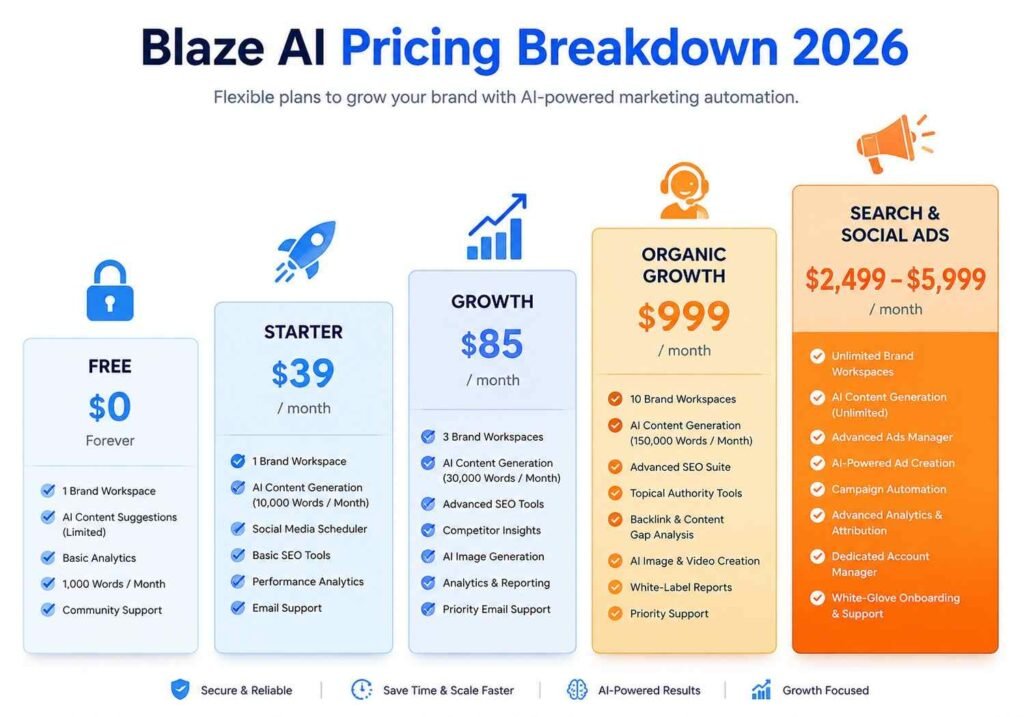
Pricing has changed more than once over the past couple of years, which is exactly why so many older articles quote numbers that no longer match the checkout page. As of this writing, Blaze uses a hybrid model: a limited free plan, self-service paid tiers billed by credits, and higher-end done-for-you packages.
| Plan Type | Approximate Price | Who It Fits | Key Limit |
|---|---|---|---|
| Free | $0 per month | Testing the platform before committing | Watermarked content, roughly one post per week per channel |
| Starter (Do It Yourself) | Around $39 per month, lower with annual billing | Solo entrepreneurs managing a few accounts | Limited monthly credits, fewer connected channels |
| Growth (Do It Yourself) | Around $85 per month, lower with annual billing | Small teams managing four or more accounts | Higher credit allowance, more channels, and more users |
| Organic Growth (Done For You) | Around $999 per month | Businesses that want a human strategist running things | Requires a longer-term commitment |
| Search and Social Ads packages | Roughly $2,499 to $5,999 per month | Businesses ready to run paid ad campaigns through Blaze | The highest tier includes full ad management |
Every plan draws from a monthly credit balance rather than offering truly unlimited generations. A single social post typically costs a small number of credits, while a blog post, email, or short AI video costs noticeably more, and video in particular can burn through an allowance fast if you rely on it heavily. It is worth timing a free trial around one realistic working week so you can see actual credit consumption before choosing a paid tier, since the headline number on the credit balance can be misleading until you have used the tool for a few days.
How to Access Blaze AI: Login and Getting Started
Getting into your account is straightforward once you know the flow.
Blaze AI Login Steps
- Visit blaze.ai and click the login or sign-in button in the top corner.
- Enter your registered email and password, or continue with a Google account if that is how you originally signed up.
- If this is your first session, you will land in a short onboarding flow that asks for your website URL and business type.
- The system builds an initial brand profile automatically, which you can edit before generating your first batch of content.
- From the dashboard, you can connect social accounts, review the current week’s content queue, and adjust brand settings at any time.
Two-factor login prompts may appear depending on your account security settings, and forgotten password recovery works through a standard email reset link sent to your registered address.
Is Blaze AI Legit? Reviews, Ratings, and Real Feedback
Search interest around “Blaze AI legit” and “Blaze AI reviews” is high enough that it deserves a straight answer instead of a marketing spin.
Third-Party Ratings
On Trustpilot, Blaze sits around 4.6 out of 5 based on more than 1,300 reviews at the time of writing. On Capterra, it scores closer to 4.8 out of 5 across roughly 700 reviews. Both figures are consistent enough across platforms to suggest they reflect genuine sentiment rather than a single inflated source, though it is fair to note some reviewers have flagged review solicitation practices that Trustpilot itself has commented on.
What Happy Users Say
Positive reviews consistently mention three things: how well the AI captures a brand’s existing tone, how much time the scheduling automation saves compared to manually posting across platforms, and responsive customer support with typical reply times reported under a few hours.
What Frustrated Users Say
The recurring complaints are less about the writing quality and more about operational friction: credit limits running out faster than expected, occasional feature removals instead of fixes when something breaks, and slower support experiences reported by a minority of long-term customers. A handful of reviewers also note that vendor-claimed statistics, like specific case study results, are not independently audited, which is a fair point to keep in mind with any company’s own marketing page.
Company Background and Blaze AI Revenue
Public business data on Blaze AI revenue varies by source, which is normal for a private company. One research firm estimated the platform reached roughly $2.9 million in annual recurring revenue with around 19 employees, describing it as largely self-funded. A separate business database lists a smaller seed round through Y Combinator early in the company’s history. Neither figure is independently audited, so treat both as informed estimates rather than confirmed financials. What is consistent across sources is that the company was founded in 2022, is based in the United States, and has grown primarily through organic short-form content rather than paid media in its early years.
Taken together, the evidence points to a real, actively used product with a genuine customer base and a documented service record, not a fly-by-night operation. That said, “legitimate business” and “right fit for your budget” are two different questions, and the pricing volatility discussed above is the part worth double-checking before you commit to an annual plan.
Blaze AI vs Popular Alternatives
If you are comparing options before signing up, here is how Blaze stacks up against a few well-known names in AI content and marketing automation.
| Tool | Best For | Standout Strength | Notable Tradeoff |
|---|---|---|---|
| Blaze AI | Small business autopilot marketing | Combines writing, scheduling, and brand voice in one workspace | A credit system can feel restrictive for heavy video use |
| Jasper AI | Longer form brand content and enterprise teams | Strong long-form writing controls and integrations | Higher price point, less built-in scheduling |
| Copy.ai | Short-form marketing copy and workflows | Flexible workflow builder for repetitive copy tasks | Less focus on automatic multiplatform posting |
| AI Blaze extension | Individual writing speed inside the browser | It’s free and works inside any text field online | Not a full content or scheduling platform |
None of these are a perfect one-to-one swap for another, since they solve slightly different problems. The honest way to choose is to match the tool to the actual job: a browser extension for individual writing speed, a full platform for hands-off business marketing, and a dedicated long-form writer if your main output is in-depth articles rather than social posts.
Who Should Actually Use Blaze AI
A few quick, practical takeaways before you decide:
- Solo business owners with no time for weekly content planning tend to get the most value from the full Blaze AI platform.
- Students, freelancers, and individual professionals who mainly want faster email and message writing should look at the free AI Blaze Chrome extension instead.
- Agencies managing several client brands benefit from the separate workspace structure, provided they budget carefully around the credit system.
- Anyone who mainly needs long, in-depth articles rather than social content may find a dedicated long-form writing tool a better primary fit, with Blaze used as a secondary scheduling layer.
Conclusion
Blaze AI is a legitimate, well-reviewed marketing automation platform that genuinely saves time for small businesses that would otherwise be writing and posting content by hand every week, while the separate AI Blaze Chrome extension serves a completely different, browser-based writing use case that fits students and individual professionals just as well. Three things are worth remembering: first, confirm which of the two products actually matches what you are trying to do before you sign up for anything; second, run the free trial and track real credit usage for a full week before choosing a paid tier, since pricing has shifted more than once; and third, treat vendor statistics with the same healthy skepticism you would apply to any company’s own homepage, while trusting the consistent third-party review scores as a fair signal of overall quality. If your goal is a genuinely hands-off content calendar, Blaze AI is worth the trial. If your goal is simply writing faster in your everyday browser tabs, start with the free AI Blaze extension first.
FAQ
What is Blaze AI in simple terms?
Blaze AI is a marketing platform that writes, schedules, and posts social media content, blog posts, and emails for small businesses. It builds a brand profile from your website, then generates a running batch of content each week for you to approve or edit before it goes live automatically.
Is Blaze AI the same as the AI Blaze Chrome extension?
No, they are different products with a similar name. Blaze AI at blaze. AI is a full marketing platform, while AI Blaze is at Blaze. Today is a free Chrome extension for faster writing inside your browser using snippets and an AI sidebar.
Is Blaze AI legit?
Yes, based on consistent ratings around 4.6 to 4.8 out of 5 across Trustpilot and Capterra, with well over a thousand combined reviews. Common complaints center on credit limits and occasional support delays rather than the product being untrustworthy.
How much does Blaze AI cost?
Pricing includes a limited free plan, self-service tiers starting around 39 dollars per month, and done-for-you management packages that can run from roughly 999 dollars up to several thousand dollars per month for full ad management. Numbers have changed before, so always confirm current pricing on the official site.
Can students use AI Blaze for schoolwork?
Yes, for drafting emails, summarizing readings, and cleaning up grammar in essays before submission. It works best as an editing and drafting aid rather than a way to generate finished assignments, since many schools have policies against submitting fully AI-written work.
How do I install the AI Blaze extension?
Search for AI Blaze in the Chrome Web Store, click Add to Chrome, then create a free account and pick your preferred AI model in the settings menu. The whole process takes only a few minutes.
How do I log into Blaze AI?
Go to blaze.ai, click the login button, and enter your email and password or continue with Google. First-time users are guided through a short onboarding flow that builds an initial brand profile from their website.
What is Blaze AI’s estimated revenue?
Third-party business trackers have estimated the company’s annual recurring revenue in the range of a few million dollars, with reports describing it as largely self-funded rather than heavily venture-backed. These figures come from independent research firms rather than audited company filings, so treat them as informed estimates.